

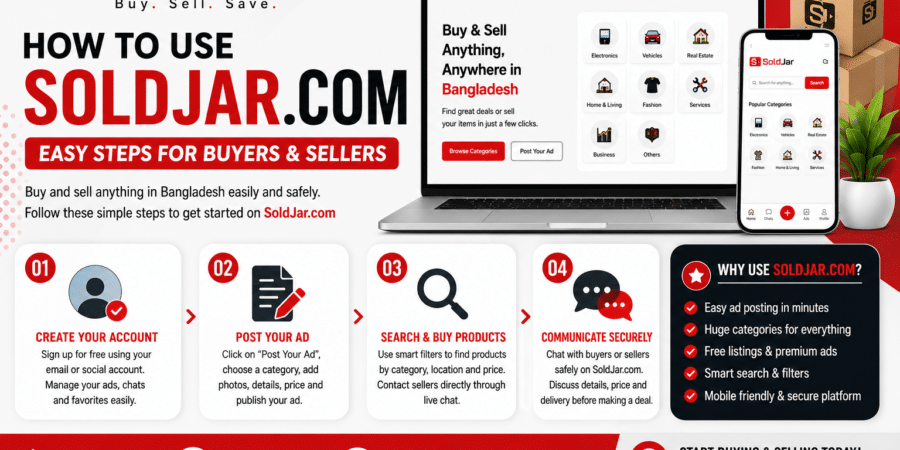
How to Use SOLDJAR.COM – Easy Guide for Buyers & Sellers
Online buying and selling has become easier than ever, and SOLDJAR.COM is helping people across Bangladesh trade products quickly and safely. Whether you want to sell an old item or buy something at an affordable price, the platform offers a simple and user-friendly experience. (Soldjar)
Step 1: Create Your Account
First, visit the website and sign up for a free account. Users can register easily using email or social login options. After creating an account, you can manage ads, chats, and favorite listings from your dashboard. (Soldjar)
Step 2: Post Your Ad
Click on “Post Your Ad” and choose the correct category such as electronics, vehicles, furniture, fashion, or real estate. Upload clear product photos, add product details, set your price, and publish the listing within minutes. (Soldjar)
Step 3: Search & Buy Products
Buyers can use smart search filters to find products by category, location, and price. Once you find an item you like, you can contact the seller directly through live chat or messaging features. (Google Play)
Step 4: Communicate Securely
SOLDJAR.COM provides secure communication features that help buyers and sellers connect safely. Users can discuss prices, delivery, and product details before making a deal. (Google Play)
Why Use SOLDJAR.COM?
The platform offers easy ad posting, advanced search options, free listings, premium advertising packages, and a mobile-friendly experience. It is designed to make online trading simple, fast, and affordable for everyone in Bangladesh. (Soldjar)
Final Thoughts
Whether you are buying a smartphone, selling furniture, or searching for second-hand products, SOLDJAR.COM makes the process smooth and convenient. With trusted features and a growing marketplace, it is becoming a smart choice for online buying and selling in Bangladesh.

Leave a Reply